Early versions of ChatGPT lacked internet connectivity. The first-generation ChatGPT models (such as GPT-3.5) were built on offline training data, with their knowledge base cut off at September 2021.
This means a lack of information timeliness. For news events, policy changes, and technological advancements after 2021 (such as the Russia-Ukraine conflict in 2022 and AI regulatory policies in 2023), the model cannot provide real-time data support.
Then there is the difficulty in relying on dynamic content: in scenarios involving real-time updates such as stock quotes, flight information, and weather, early models could only generate simulated data based on historical patterns rather than real results.

Technological Breakthroughs and Challenges in Internet Connectivity
OpenAI gradually introduced internet connectivity capabilities in 2023, a process that underwent multiple technical iterations:
- Initial Testing and Withdrawal (May 2023)Initially, internet connectivity was achieved by integrating Microsoft Bing’s search API. However, due to users bypassing paywalls to access content and security risks (such as accessing malicious websites), the feature was disabled just two months after launch.
- Feature Optimization and Re-launch (September 2023)The improved version added the following mechanisms:
- Adhering to the robots.txt protocol: Respecting website crawling rules to avoid infringing on content copyrights.
- User-agent identification: Clearly marked as “ChatGPT-User” to facilitate website access control.
- Security filtering: Inheriting Bing’s “Safe Mode” to filter harmful content such as pornography and violence.
- Gradual Opening StrategyThe internet connectivity feature was first made available to ChatGPT Plus subscribers (requiring the selection of the GPT-4 model), then expanded to the enterprise version, with plans to cover free users in the future. This process reflects OpenAI’s balance between risk control and user experience.
Core Value of Internet Connectivity
The introduction of internet connectivity has significantly enhanced ChatGPT’s practicality, specifically in the following aspects:
- A Leap in Information AccuracyFor example, after October 2023, users could directly ask about “the latest Nobel Prize winners” or “the Federal Reserve’s latest interest rate decisions,” and the model could fetch real-time information from authoritative sources with reference links.
- Scenario Expansion and Specialization
- Real-time data analysis: Supporting professional fields such as stock trend prediction and e-commerce price monitoring.
- Enhanced multimodal interaction: Combining image recognition (e.g., uploading product images to ask for reviews) and voice input to achieve more natural human-machine dialogue.
- Reducing Hallucinations and ErrorsBy citing external data, the model can verify the authenticity of generated content, reducing the probability of “fabricating facts.” For instance, when answering technical questions, it attaches links to relevant papers or news as evidence.
But does the internet connectivity feature mean that ChatGPT’s backend deploys hundreds of millions of crawlers to obtain real-time data from the internet? The answer is no.
After all, with the massive amount of data on the internet, it would be impractical for ChatGPT to deploy its own crawlers to fetch data for model analysis. Firstly, there is too much internet data, and crawlers may not be universally applicable to all. Additionally, data cleaning is a problem. Developing all crawlers in-house would be like reinventing the wheel—building a search engine like Google or Bing.
Common Issues with Web Scraping APIs
- Technical Issues
- Dynamic content loading: Modern websites often use JavaScript for dynamic content loading, which traditional scraping tools may fail to handle. Solutions include using headless browsers like Puppeteer or Selenium to simulate user interactions, and using waiting times to ensure dynamic content is fully loaded.
- Anti-scraping measures: Websites may block crawlers through IP blocking, rate limiting, etc. Methods such as using proxy IPs, reducing request frequency, and rotating user agents can be employed to cope with this.
- Website structure changes: Changes in a website’s HTML structure may render crawlers ineffective. Adapting to such changes can be done by selecting elements using data attributes or semantic tags and regularly checking the website structure.
- Performance Issues
- Scalability and performance: Performance bottlenecks may occur when processing large amounts of data. Performance can be improved through parallel crawling, using rate limiting, optimizing code and data structures, and leveraging caching and asynchronous programming.
- Data Issues
- Data inconsistency and bias: Collected data may have differences in format, units, and granularity. This can be addressed through data validation, cleaning, and standardization.
- Incomplete data: Scraped data may be incomplete or contain missing values. Missing data can be supplemented using data imputation techniques and information from different sources.
- Legal and Ethical Issues
- Legality: In some cases, web scraping may violate a website’s terms of service or relevant laws and regulations. Before conducting web scraping, ensure compliance with the rules in the robots.txt file, the website’s terms of use, and relevant legal provisions.
- API Limitations
- Access restrictions: Some APIs may have call limits or require authorization. It is necessary to understand the API’s usage restrictions and, if necessary, apply for higher permissions or use multiple API keys.
- Solutions and Tools
- Using proxy IPs: When an IP is blocked, proxy IPs can be changed to continue scraping tasks.
- Using APIs: If a website provides an API, prioritize using it to obtain data, as it is generally more reliable, faster, and easier to process.
- Error Handling
- Unified error codes and messages: Define a set of unified error codes and messages to facilitate front-end identification and handling of errors.
- Interface Design
- RESTful style: Design APIs following the RESTful style to make interfaces more intuitive and understandable.
- Documentation and Support
- API documentation: Ensure there is detailed API documentation, including interface addresses, request parameters, response formats, etc.
- CAPTCHA Issues
- CAPTCHA challenges: Websites may use CAPTCHAs to block automated scraping. Specialized CAPTCHA-solving services can be used to address this.
Therefore, ChatGPT or LLM models generally obtain real-time search data by calling SerpAPI, which saves a lot of unnecessary trouble. After all, since there are ready-made tools available, there is no need to reinvent the wheel.
So, What is SerpAPI?
SerpAPI is a powerful search API that can retrieve results from multiple search engines. It supports platforms such as Google, Bing, and Yahoo, and can be switched through simple configurations.
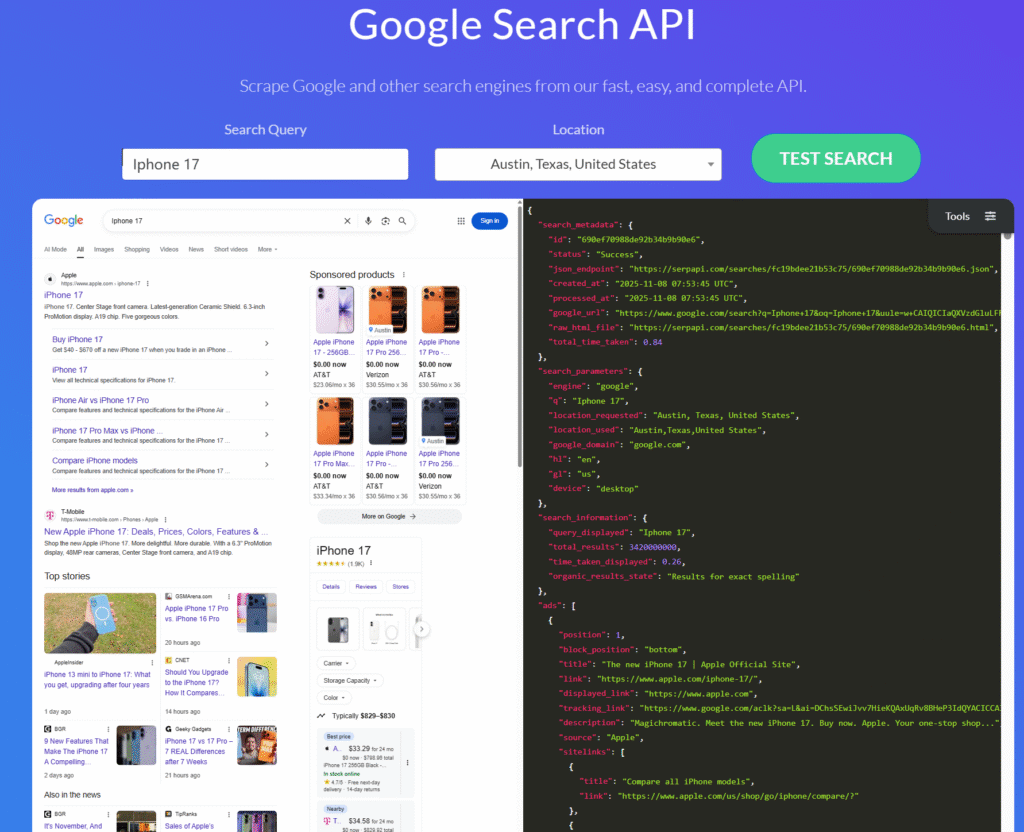
SerpApi is a real-time API that provides access to Google search results. It handles proxies, solves CAPTCHAs for clients, and parses all rich structured data. This API allows users to easily obtain Google search results without directly interacting with Google Search or dealing with complex crawlers and CAPTCHA issues. Through SerpApi, users can quickly get the search results they need, which are provided in a structured format for further processing and analysis. Currently, several common SERP API providers on the market include:
- [Serpapi-Google Search]: Quickly, simply, and completely scrape data from Google, Baidu, Bing, eBay, Yahoo, Walmart, and other search engines.
- [Serpdog Search Engine Data Scraping]: This API provides enterprises and developers with a fast and efficient way to collect search engine data, with online experience available.
- [Bright Data – SERP API]: Through this API, users can obtain search results, ranking information, advertising data, keyword suggestions, etc., helping them gain in-depth insights into market dynamics, analyze competitors, and adjust SEO strategies.
Here is an example of how to use SerpAPI to obtain search engine data.
First, register an account on the website https://serpapi.com/ to get an API key.
It allows querying with different parameters on the webpage.
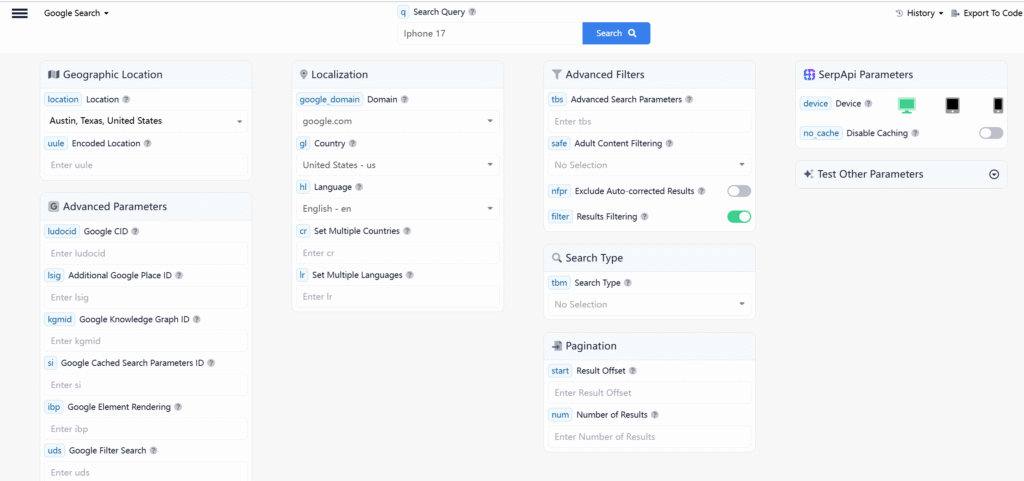
Selecting different parameters will output different search results. For example, if the region is set to the United States, the first result for searching “iPhone 17” will be a link to an Amazon store. If the region is set to China, the first website in the search results may be a link to a Chinese e-commerce platform like JD.com.
Installation
Install the serpapi library using pip:
pip install google-search-resultsBasic Usage
api_key is the key obtained from the registered website mentioned earlier, and engine specifies which search engine to use for results.
params = {
  "api_key": "8f6b88f0aece8ee19f6673eba5fc5f7a4e5114b74567521e86ca83c46d9de8a7",
  "engine": "google",  # Search engine to use
  "q": "Iphone 17", # Search keyword
  "location": "Austin, Texas, United States", # Simulated region
  "google_domain": "google.com",
  "gl": "us",
  "hl": "en"
}

search = GoogleSearch(params)
results = search.get_dict()
print(results)
The printed search results are as follows:
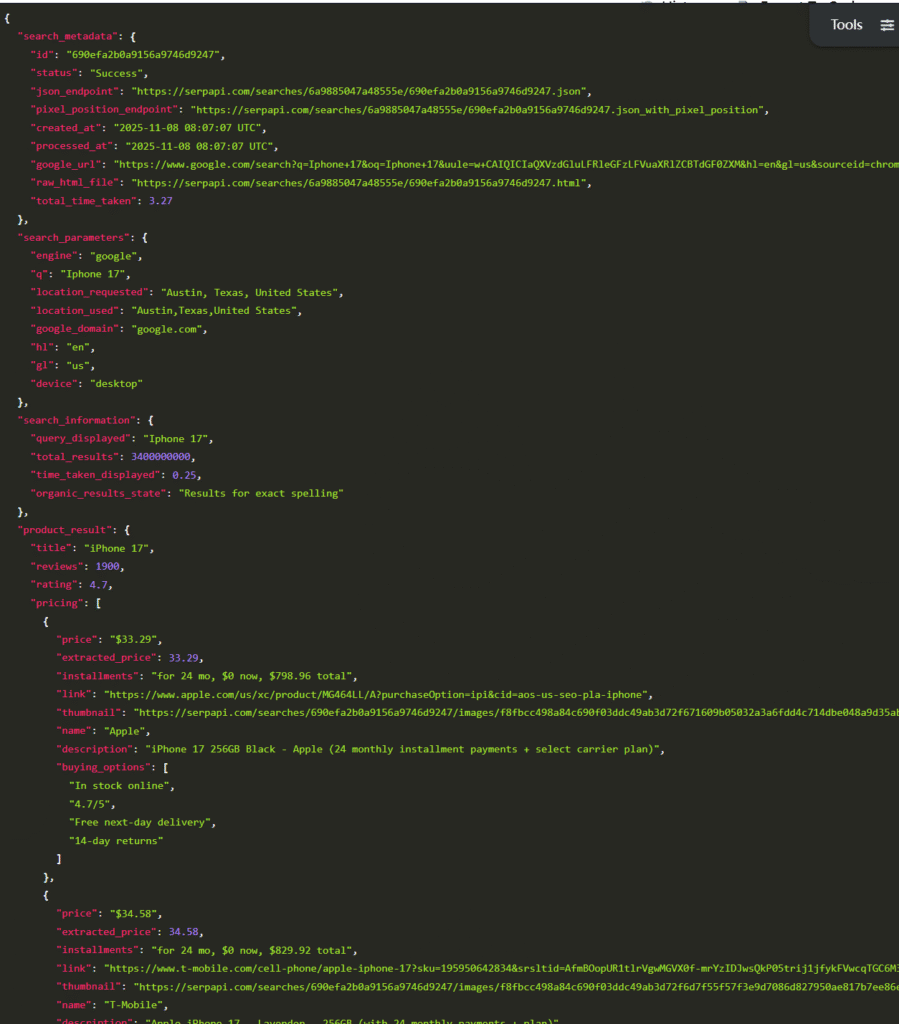
The output structured data corresponds to the structured data from Google Search results.
The “raw_html_file” field contains the original HTML data. When opened and rendered in a browser, it is identical to the Google Search results.
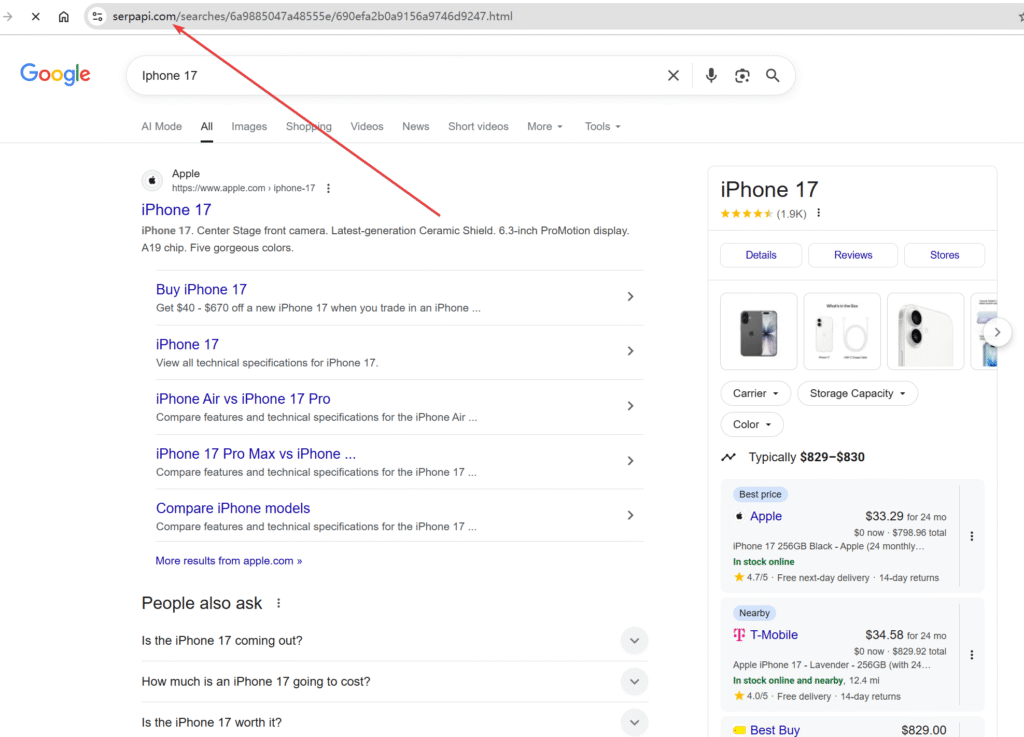
It comes from the stored data on the SerpAPI site.
More detailed parameters can be configured during the query to get granular results.
params = {
  "q": "coffee",
  "location": "Location Requested",
  "device": "desktop|mobile|tablet",
  "hl": "Google UI Language",
  "gl": "Google Country",
  "safe": "Safe Search Flag",
  "num": "Number of Results",
  "start": "Pagination Offset",
  "api_key": "Your SerpApi Key",
  # To be match
  "tbm": "nws|isch|shop",
  # To be search
  "tbs": "custom to be search criteria",
  # allow async request
  "async": "true|false",
  # output format
  "output": "json|html"
}

# define the search search
search = GoogleSearch(params)
# override an existing parameter
search.params_dict["location"] = "Portland"
# search format return as raw html
html_results = search.get_html()
# parse results
#  as python Dictionary
dict_results = search.get_dict()
#  as JSON using json package
json_results = search.get_json()
#  as dynamic Python object
object_result = search.get_object()
In addition to Google, it supports multiple mainstream search engines on the market. Here are examples of switching to other search engines such as Bing, Yandex, and Yahoo.
Bing
from serpapi import BingSearch
search = BingSearch({"q": "Coffee", "location": "Austin,Texas"})
data = search.get_dict()
Yandex
from serpapi import YandexSearch
search = YandexSearch({"text": "Coffee"})
data = search.get_dict()
Yahoo
from serpapi import YahooSearch
search = YahooSearch({"p": "Coffee"})
data = search.get_dict()
The only difference lies in the definition; the parameters used are the same as the params above.
This tutorial mainly helps you understand SerpAPI and its basic usage. More details on integrating with local LLM models will be covered later.